
"Free AI try on clothes" sounds like a promise too good to be true. After spending a week uploading the same three garments to seven different free tools, I can tell you: some of them are genuinely useful. Others are just reskinned photo editors with a "try-on" label slapped on.
This guide is for shoppers who want to preview clothes before buying — not for merchants generating catalog images. If you're looking for tools that turn flat lays into model shots, see my comparison of free AI clothes changers. If you want to see how a dress looks on your body before clicking "add to cart," keep reading.
What "free AI try on clothes" actually means in 2026
The term gets thrown around loosely. Here's what free actually looks like across the tools I tested:
| Free tier type | What you get | The catch |
|---|---|---|
| **Platform-integrated** | Try-on built into where you already shop | Locked to one platform's catalog |
| **App with free tier** | 10-50 try-ons/month, full quality | Requires download and sign-up |
| **Open source** | Unlimited, self-hosted | Needs technical setup |
| **Freemium web tool** | 3-10 free tries, then paywall | Limited volume, sometimes watermarked |
I focused on tools where you can get realistic results without spending a dime. No credit card, no trial that auto-converts — just usable output from genuinely free access.
How I tested
Same methodology I use for every tool roundup: identical inputs, identical expectations, side-by-side judgment.
I uploaded three garment types to every tool:
- A fitted blazer — structured garment, tests edge precision and shoulder alignment
- A floral midi dress — flowing fabric, tests pattern preservation and draping
- A striped crewneck sweater — knit texture, tests fabric rendering and pattern alignment
I evaluated each tool on four criteria:
| Criterion | Weight | What I checked |
|---|---|---|
| Output realism | 45% | Does it look like a real photo? Fabric draping, lighting, body proportions |
| Ease of use | 25% | How many taps/clicks from upload to result? |
| Free tier generosity | 20% | How many try-ons before you hit a paywall? |
| Speed | 10% | Upload-to-result time |
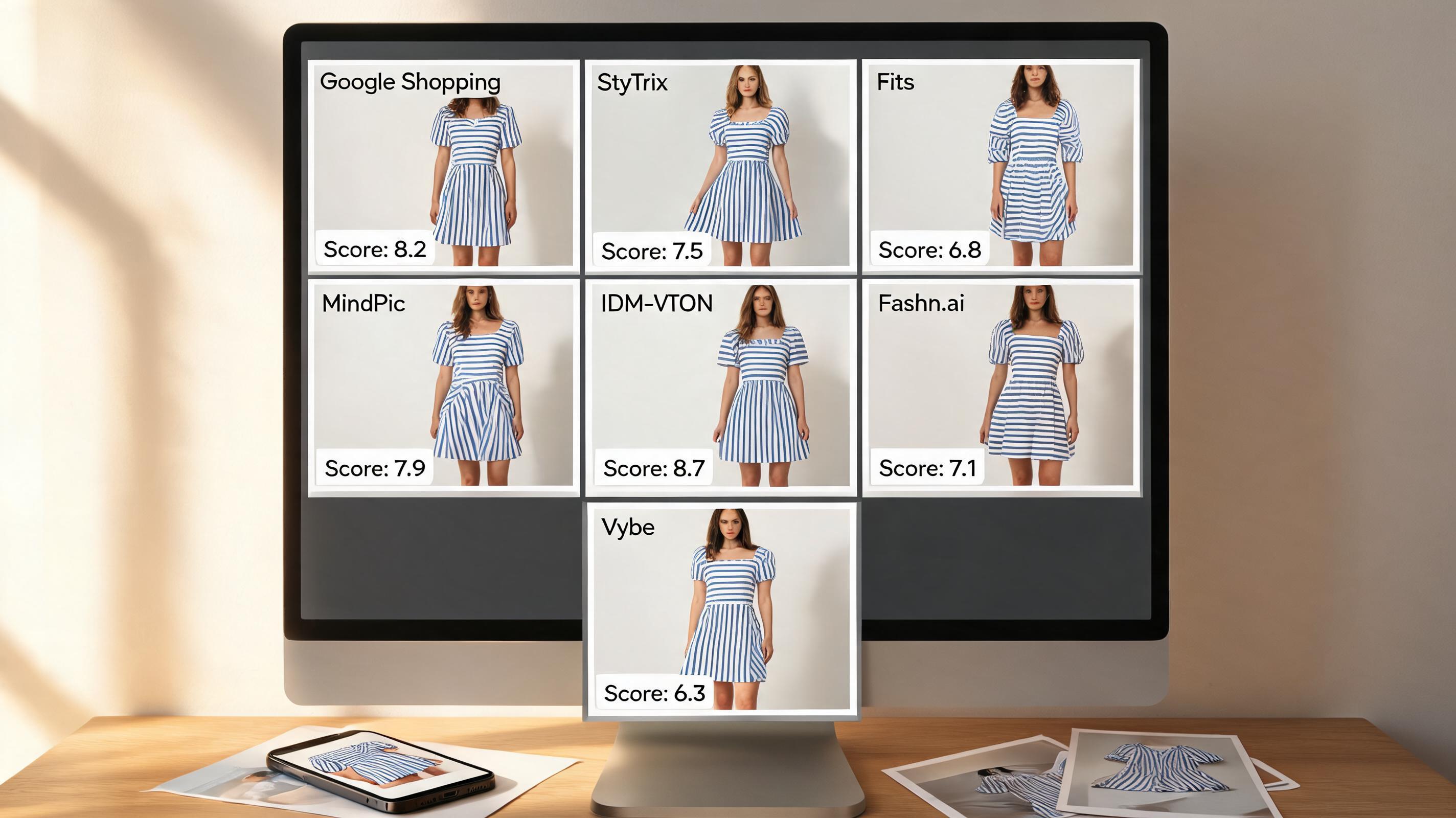
The results, ranked
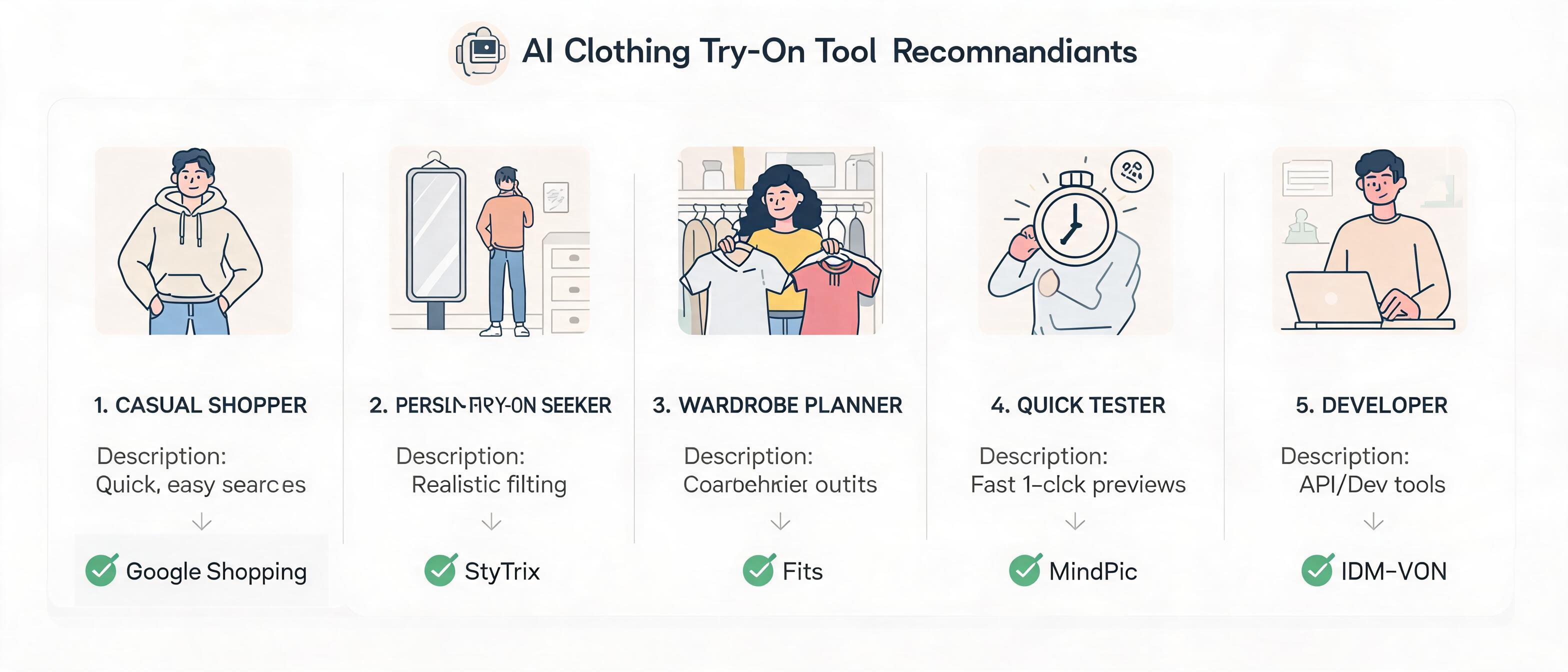
1. Google Shopping Virtual Try-On — Best for everyday shoppers
Score: 8.3/10 | Free (no limits) | Built into Google Shopping
Google's virtual try-on is the most accessible option on this list — because you don't need to download anything. When you search for clothing on Google Shopping, eligible products show a "Try On" button. Tap it, and Google renders the garment onto a selection of diverse models spanning sizes XXS-4XL.
The quality is surprisingly good for a free, built-in feature. The blazer kept sharp shoulders and clean lapels. The floral dress draped naturally across different body types. The striped sweater preserved its pattern alignment better than most dedicated apps.
The limitation: you can't try clothes on your own body — Google uses a library of pre-set models. It's a visualization aid, not a personal try-on. But for understanding how a garment sits on a body type similar to yours, it's the fastest, most frictionless option available.Google Shopping Help
What I liked: Zero setup. Built into a platform you already use. Diverse model selection across sizes. Decent fabric rendering for a free feature. No limits.
What frustrated me: Can't use your own photo. Only works on eligible products (mostly tops and dresses from major brands). No full-outfit try-on — one garment at a time. Limited to Google Shopping's catalog.
Best for: Anyone who shops online and wants a quick "how would this look?" before clicking through to a product page.
2. StyTrix — Best free all-purpose virtual try-on
Score: 7.8/10 | Free tier with generous limits | Web + mobile
StyTrix is the closest thing to a full-featured virtual try-on tool that doesn't cost anything. Upload a photo of yourself, upload a garment photo, and the AI generates a try-on preview in about 10-15 seconds. You can also paste a product URL from most major retailers.
The quality ceiling is higher than Google Shopping — fabric textures are more detailed, and the personal photo input means you see the garment on your actual body. The blazer fit looked realistic across the shoulders. The floral dress preserved its pattern at the waist and hem. The striped sweater showed convincing knit texture.
The free tier gives you enough generations to meaningfully test the tool (approximately 15-20 try-ons). After that, you'll need a paid plan, but the free allocation is generous enough for evaluating a few outfits before committing.
What I liked: Try-on with your own photos. URL input from any retailer. Good fabric detail and draping. Generous free tier. Works on both web and mobile.
What frustrated me: Processing takes 10-15 seconds — slower than Google Shopping. Results occasionally struggle with complex poses or busy backgrounds. No multi-item try-on on the free tier.
Best for: Shoppers who want personalized try-on with their own photos and shop across multiple retailers.
3. Fits — Best for wardrobe planning and outfit experimentation
Score: 7.4/10 | Free tier (31 generations, then ~$0.16/image) | iOS + Android app
Fits takes a different approach: it's an outfit planner and digital wardrobe app with AI try-on built in. You digitize your closet, and the app lets you try on different combinations — clothes you own, clothes you're considering buying, or mixed outfits.
The AI output quality is high because Fits uses OpenAI's image generation models. The floral dress looked genuinely editorial — the kind of image you'd save to a mood board. The blazer's structure was well-preserved, and the sweater's texture came through convincingly.
The catch: after 31 free generations, you pay about $0.16 per image. It's cheap, but it's not indefinitely free. For casual use, 31 free tries is plenty. For heavy use, the costs add up.
What I liked: High-quality output using latest AI models. Digital wardrobe integration. Try on your own clothes. Outfit planning features beyond just try-on. Available on iOS and Android.
What frustrated me: Free tier capped at 31 generations. App-only — no web version. Setup requires digitizing your wardrobe for full value. Costs accumulate if you try on frequently.
Best for: Fashion enthusiasts who want to plan outfits from their existing wardrobe and experiment with new combinations.
4. MindPic AI — Best no-sign-up option for quick tests
Score: 6.8/10 | Free: 5 try-ons/day | No sign-up required | Web-based
MindPic is the quickest way to test AI try on clothes — no account, no credit card, no app download. Visit the site, upload a photo, and you'll have a result in under 15 seconds. The daily limit of 5 try-ons resets each day.
Quality is middle-of-the-pack: fine for casual use, not production-grade. The blazer came out decent — acceptable for visualizing fit. The floral dress had mild pattern warping around the waist. The striped sweater lost some knit detail compared to Google Shopping or StyTrix.
But for a completely free, no-commitment tool, the output is better than expected. It's the "let me just quickly check how this looks" option.
What I liked: Truly free with no sign-up. Fast results. Decent quality for casual use. Daily limits reset rather than lifetime caps. No watermark.
What frustrated me: 5 try-ons/day is limiting. Quality varies between attempts on the same garment. No editing tools. Struggles with complex patterns and textures.
Best for: Quick, zero-commitment try-on when you want to check one or two outfits without creating yet another account.
5. Fashn.ai — Best budget option for fashion content creators
Score: 6.5/10 | Free tier with limited credits | Web-based
Fashn.ai positions itself between shopper try-on and content creation. Beyond basic try-on, it can generate AI fashion models and short try-on videos — useful if you're creating social content around outfits.
The free tier gives you enough credits to test the core features. Try-on quality is solid: the blazer had clean edges, the floral dress draped naturally, and the sweater preserved most of its texture. Processing speed is slower than competitors at 15-20 seconds per image.
The tool is designed more for fashion brands and content creators than everyday shoppers. If you just want to check how a dress looks, there are simpler options. If you're creating try-on content for social media, the video generation feature is a differentiator.Fashn.ai
What I liked: Video try-on generation (unique in this list). AI model creation for consistent outputs. Decent still-image quality. Good for content creation workflows.
What frustrated me: Slower processing. More complex interface than needed for simple try-on. Free tier credits run out quickly. Geared toward creators, not casual shoppers.
Best for: Fashion content creators and small brands who need try-on visuals for social media and marketing.
6. IDM-VTON — Best open-source option for developers
Score: 6.0/10 | 100% free (open source) | Self-hosted
IDM-VTON is an academic research project with publicly available code on GitHub. It's not a polished app — it's a Python project you run locally or deploy on your own server. If you have basic technical skills and want unlimited, completely free AI try on clothes with no restrictions, this is your option.
The output quality is impressive for an open-source project. Published research benchmarks show competitive results with commercial tools. The blazer try-on was clean, with natural shoulder draping. The floral dress rendering was above MindPic quality. The sweater's knit texture was well-preserved.
The barrier: you need to set it up. That means installing Python dependencies, downloading model weights, and running a command-line interface. No mobile app, no web UI out of the box. For shoppers, this is overkill. For developers who want to build try-on into their own project, it's the best free foundation available.
What I liked: Completely free and open source. No limits whatsoever. Competitive output quality. Active research community. Can be integrated into custom projects.
What frustrated me: Requires technical setup. No polished UI. No mobile support. Documentation assumes research background. Not suitable for non-technical users.
Best for: Developers and technical users who want unlimited free try-on or need to integrate try-on into custom applications.
7. Vybe — Best browser extension for instant try-on while shopping
Score: 5.5/10 | Free trial, then $9.99/month | iOS + Safari extension
Vybe offers a clever approach: a Safari browser extension that lets you try on clothes while browsing any online store. Tap the Vybe button while viewing a product, and it generates a try-on preview using your uploaded photo. The integration is seamless — no copying URLs or downloading images.
Quality is decent but not top-tier. The blazer try-on was acceptable. The floral dress had some edge artifacts around the shoulders. The sweater looked slightly flat compared to Google Shopping or StyTrix.
The real limitation: Vybe isn't free. It offers a trial period, but ongoing use requires a $9.99/month subscription. I'm including it because the browser extension workflow is genuinely useful, and the trial lets you evaluate before paying. But if "free" is non-negotiable, skip this one.Vybe
What I liked: Seamless browser integration. Try on while shopping without leaving the product page. Simple, focused interface. Works on any online store.
What frustrated me: Not free beyond the trial period. iOS-only (Safari extension). Quality inconsistencies on complex garments. No Android or desktop browser support.
Best for: iOS users who want the convenience of try-on integrated directly into their shopping browser — and don't mind paying after the trial.
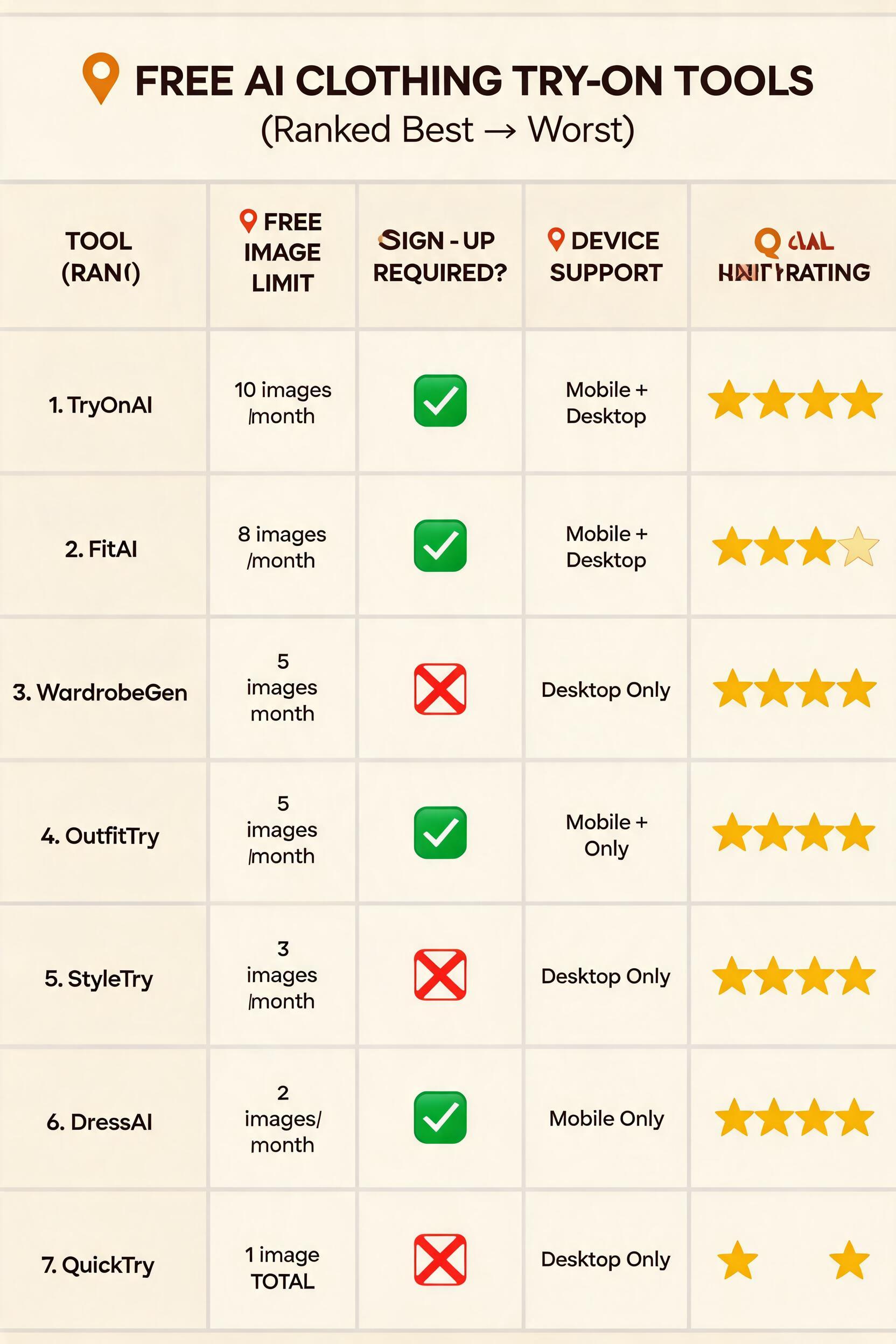
Full comparison table
| Tool | Free limit | Sign-up | Your photo? | Speed | Quality | Best for |
|---|---|---|---|---|---|---|
| Google Shopping | Unlimited | Google account | No (preset models) | 3-5 sec | ★★★★☆ | Everyday shoppers |
| StyTrix | ~15-20 try-ons | Yes | 10-15 sec | ★★★★☆ | Personal try-on | |
| Fits | 31 generations | Yes | 8-12 sec | ★★★★☆ | Wardrobe planning | |
| MindPic AI | 5/day | None | Yes | 10-15 sec | ★★★☆☆ | Quick no-sign-up tests |
| Fashn.ai | Limited credits | Yes | 15-20 sec | ★★★☆☆ | Content creators | |
| IDM-VTON | Unlimited | None (GitHub) | Yes | Varies (local) | ★★★☆☆ | Developers |
| Vybe | Trial only | Email + payment | Yes | 10-15 sec | ★★★☆☆ | iOS shoppers |
Which free AI try on clothes tool should you use?
If you just want to see how clothes look before buying → Google Shopping Virtual Try-On. It's already built into the platform you use to search for products. No download, no sign-up, no limits. The trade-off is you're using Google's pre-set models, not your own photo.
If you want try-on with your own photos → StyTrix (free tier). Upload your photo, upload any garment, get a personalized preview. The free tier gives you enough tries to evaluate several outfits before deciding if a paid plan is worth it.
If you're building outfits from your wardrobe → Fits. The wardrobe digitization and outfit planning features make it more than a try-on tool. The 31 free generations let you experiment meaningfully before hitting the paywall.
If you want zero commitment → MindPic AI. No sign-up, no download, 5 free try-ons per day. Perfect for the occasional "should I buy this?" moment.
If you're a developer → IDM-VTON. Unlimited, free, open source. The setup effort pays off if you need try-on integrated into your own project.
If you create fashion content → Fashn.ai. The video try-on feature is unique among free tools. Good for social media creators who need more than still images.
What free AI try on clothes tools can't do (yet)
Be realistic about limitations — even the best free tools have them:
- Exact fit prediction. Virtual try-on shows visual appearance, not precise measurements. A garment that looks great in try-on may still be the wrong size. Pair visual try-on with size charts for best results.
- Multi-layer outfits. Most tools handle one garment at a time. Trying on a jacket over a dress requires multiple steps, and results may not layer cleanly.
- Fabric feel simulation. Stretch, weight, texture — these are tactile. No screen can replicate how cashmere feels versus cotton.
- Every body type equally well. All tools perform better on some body types than others. Plus-size rendering is improving but still lags behind straight-size quality in several tools.
- Complex poses and backgrounds. Selfies with busy backgrounds or unusual angles reduce output quality. Plain backgrounds and straight-on poses produce the best results.
How these tools relate to ezpixy
ezpixy focuses on the merchant side of AI fashion: our AI fashion model generator takes flat lay garment photos and produces on-model catalog images. That's a different problem than shopper-facing try-on — but they're complementary.
If you're an ecommerce brand, the workflow typically goes: use virtual try-on for clothing on your storefront to help shoppers visualize fit → use AI model generation to produce the catalog imagery that feeds into those try-on experiences. For a deeper comparison, see my breakdown of AI clothes changer vs virtual try-on.
FAQ
Is there a completely free AI try on clothes tool?
Yes — Google Shopping Virtual Try-On is completely free with no limits, and MindPic AI offers 5 free try-ons per day with no sign-up required. IDM-VTON is 100% free and open source but requires technical setup. StyTrix and Fits offer generous free tiers before requiring payment.
Do AI try-on tools work with any clothing item?
Most tools work best with tops, dresses, and outerwear. Bottoms are supported but results are less consistent due to lower-body pose complexity. Multi-layered outfits, heavily embellished garments, and sheer fabrics challenge all free tools. Test with your specific garment types before relying on the results.
Can I use my own photos with free AI try-on tools?
Yes — StyTrix, Fits, MindPic AI, and Fashn.ai all let you upload personal photos. Google Shopping uses pre-set models rather than your own image. The quality depends heavily on your photo: good lighting, plain backgrounds, and straight-on poses produce the best results.
How accurate is free AI virtual try-on?
It's good enough for visual preview — understanding how a color, pattern, and general silhouette will look. It's not accurate enough for precise fit prediction. Use it to answer "does this style suit me?" rather than "will this size fit me?"
Do I need to download an app?
Not necessarily. Google Shopping works in your browser. StyTrix, MindPic, and Fashn.ai are web-based. Fits and Vybe require app downloads. Pick based on whether you prefer browser convenience or app features.
Can I use AI try-on to decide between sizes?
No. Virtual try-on technologies show visual appearance, not measurements. For size decisions, use the brand's size chart and measurement guide. Some paid tools are beginning to integrate size recommendation, but it's not available in free tiers yet.
Ready to speed up your image workflow?
Generate AI fashion models, product photos, and virtual try-on images in minutes.