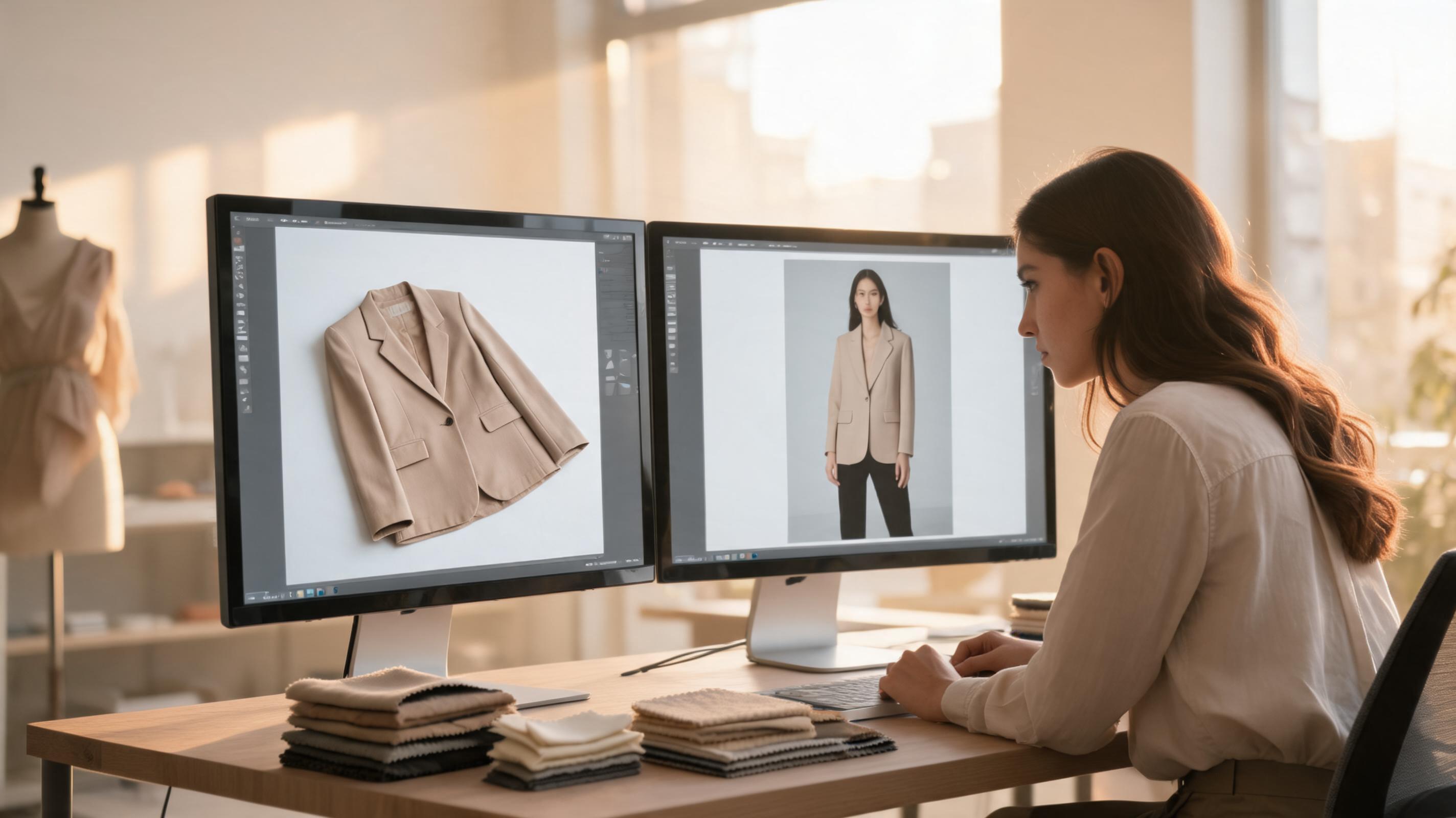
If you run an apparel brand, you know the photography bottleneck. Booking models, renting studio space, managing styling, waiting for post-production — a single collection shoot can eat two weeks and $5,000-$15,000 before you have a single usable product image. An AI fashion model generator changes that equation: it takes your existing product photos — flat lays, mannequin shots, hanger images — and produces photorealistic on-model catalog images in minutes, not weeks.
I've spent the past few months testing AI fashion model generators across different garment types, catalog sizes, and ecommerce platforms. This guide covers what these tools actually do, how the technology works in plain terms, a step-by-step implementation plan, and what to realistically expect from quality and cost. Whether you're running a 50-SKU Shopify store or managing a 500-SKU catalog across multiple marketplaces, here's what you need to know.
What an AI fashion model generator actually does
An AI fashion model generator takes a garment photo as input — a flat lay on a wooden floor, a mannequin shot, a hanger image — and produces a new image showing that exact garment worn by a photorealistic model. The model's appearance, pose, body type, and background are all configurable. One product photo can generate dozens of variations without a single studio booking.
This is different from virtual try-on, which helps shoppers preview how clothes might look on themselves. An AI fashion model generator is a content production tool for your team. The output goes on product pages, marketplace listings, ad creative, and email campaigns. The shopper never sees the workflow — they see the result.
For most apparel brands, this solves three problems at once:
- Speed: A traditional shoot takes 2-3 weeks from booking to final images. AI generation takes minutes per image, and batch processing handles 50+ SKUs in a single session.
- Cost: Studio photography costs $100-$268 per SKU when you factor in the model, photographer, studio, styling, and post-production. AI generation costs under $1 per image at volume.
- Consistency: Maintaining the same model, lighting, and composition across hundreds of SKUs is nearly impossible with traditional photography. AI model generators apply the same settings across your entire catalog, creating a cohesive look on category pages and collection listings.
How AI fashion model generation works (in plain terms)
You don't need a computer science degree to use these tools, but understanding the basics helps you set realistic expectations.
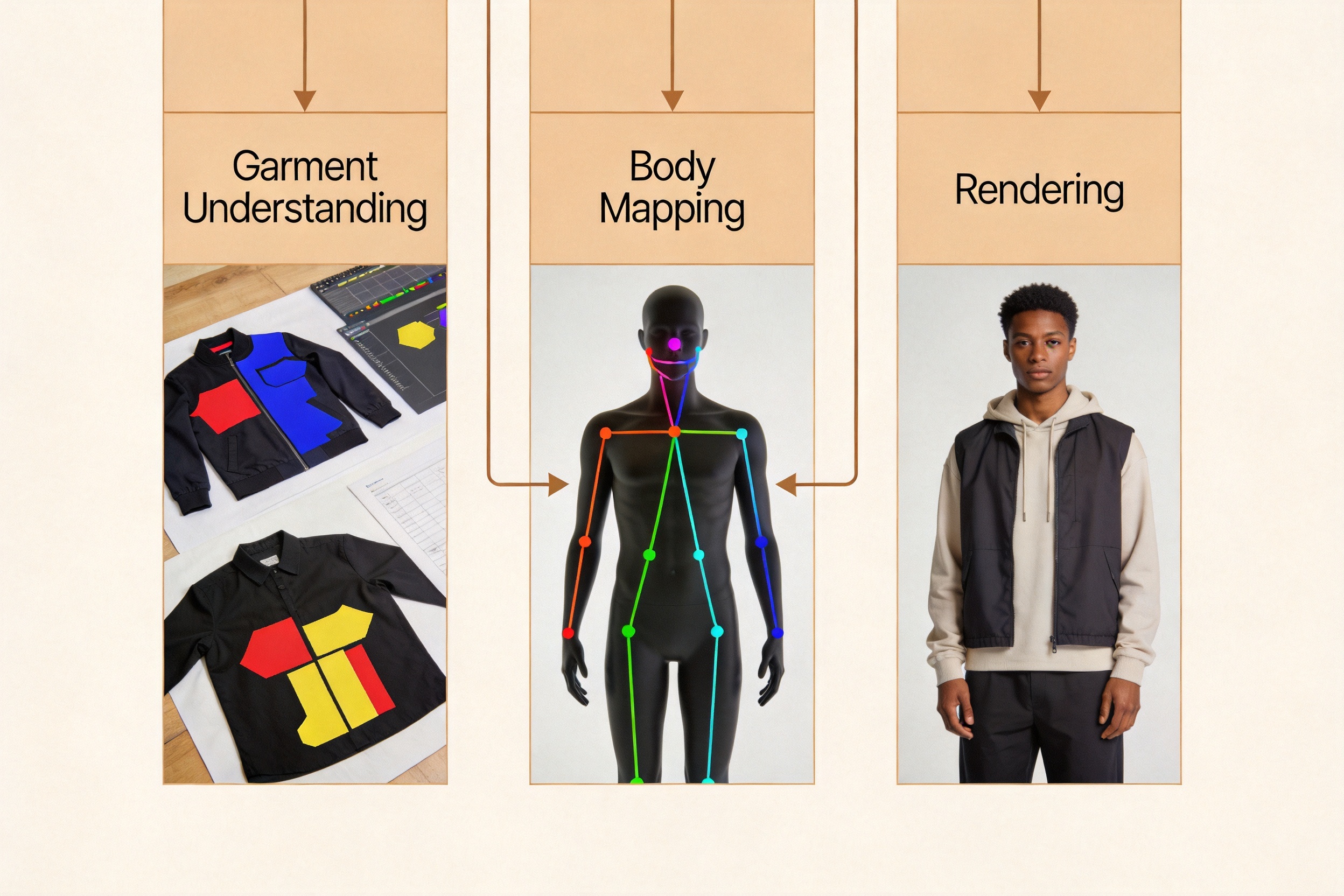
Modern AI fashion model generators use diffusion models — the same class of AI behind tools like Midjourney and DALL-E, but specialized for clothing. The process works in three stages:
Stage 1: Garment understanding. The AI analyzes your product photo and identifies the garment's structure — sleeves, collar, hemline, closures, print pattern, fabric texture. It segments the clothing from the background and builds a digital representation that preserves the garment's visual identity.
Stage 2: Body mapping. Using pose estimation, the AI understands where the model's shoulders, elbows, hips, and knees are. This skeletal map tells the system how the garment should drape and where it should crease. Without this step, you get the distorted proportions and floating garments that plagued early AI try-on tools.
Stage 3: Rendering. The AI composites the garment onto the model, generating new pixels for fabric drape, shadows, and lighting that match the scene. The output is a single photorealistic image that looks like a studio photograph.
The key word is "looks like." AI fashion model generators produce visual representations — they don't physically simulate fabric physics. Structured garments (shirts, jackets, trousers) typically produce the most reliable results. Flowing fabrics, sheer materials, and heavily embellished pieces are more challenging and may require more regeneration attempts.
Step-by-step: implementing an AI fashion model generator for your brand
I've distilled this from working with brands that deployed these tools successfully — and from watching others waste time on half-baked rollouts.
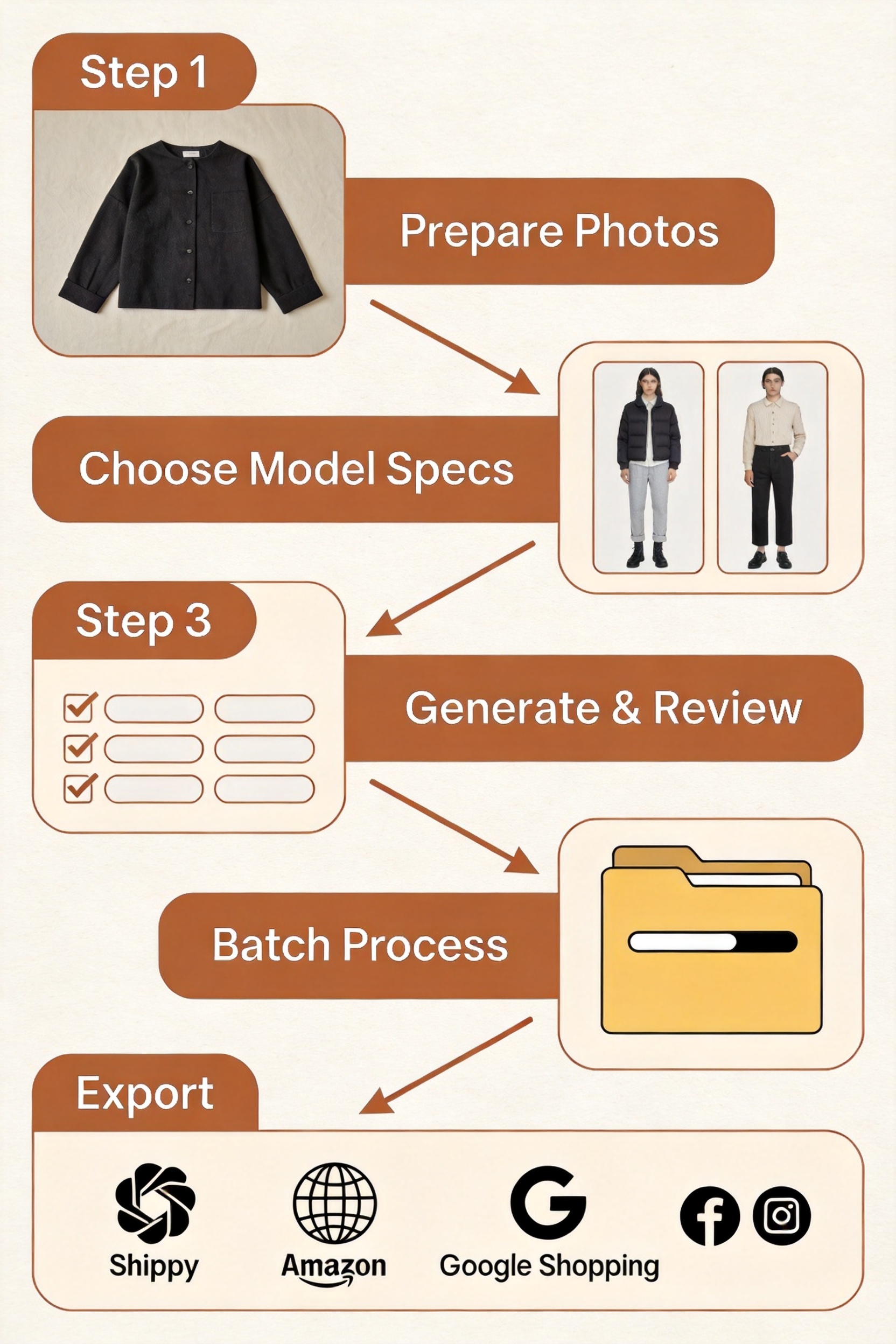
Step 1: Prepare your product photos
The quality of your output depends heavily on your input. You don't need studio-grade photography, but you do need consistency:
- Use clean, well-lit product photos. Flat lays on neutral backgrounds work best. Mannequin shots are the next best option. Hanger shots work but may produce less consistent results.
- Avoid busy backgrounds. Wood grain, patterned surfaces, and cluttered desks confuse the AI's garment segmentation. A plain white or light gray surface is ideal.
- One product per photo. Multiple garments in one frame will confuse the system. Crop tightly to the product.
- Consistent lighting across your catalog. If half your products are shot in warm light and half in cool light, the AI outputs will show inconsistent color temperature — even if the model and background are identical.
A brand I worked with skipped this step and uploaded 200 product photos with wildly different lighting. Their first batch of AI-generated images looked like they came from five different brands. They spent a week re-shooting with consistent lighting before trying again. Learn from their mistake: standardize your inputs first.
Step 2: Choose your model specifications
Most AI fashion model generators let you configure:
- Body type and size. From straight size to plus size, with multiple options calibrated for accurate garment representation.
- Skin tone and ethnicity. Choose models that represent your target audience and brand identity.
- Pose and angle. Front-facing, three-quarter turn, walking pose — pick what works for your category page layout.
- Background. Studio white, lifestyle scene, or custom setting.
The smartest brands I've seen lock a single model preset and apply it across their entire catalog. This creates the consistent, professional look that category pages need. If your brand targets multiple demographics, create one preset per demographic and assign products accordingly.
Step 3: Generate and review
Upload your product photo, select your model preset, and generate. Single images typically process in 30-60 seconds. Review each output for:
- Garment fidelity. Does the print, color, neckline, and silhouette match your product? If the AI blurred your plaid pattern or changed the shade of blue, regenerate.
- Edge quality. Check the neckline, cuffs, and hem. The transition between garment and model should look natural, not pasted on.
- Anatomy check. Are the hands normal? Are the proportions realistic? AI models occasionally produce distorted fingers or unnatural limb positions — these are easy to spot and regenerate.
Plan for a 70-85% hit rate on first generation. The remaining 15-30% will need a regeneration or two. This is normal — even the best tools don't produce perfect results on every attempt.
Step 4: Batch process your catalog
Once you're happy with your settings on a few test products, scale up. Most AI fashion model generators support batch processing:
- Upload all product photos (or select them from your catalog)
- Apply your saved model preset and background settings
- Process all at once — 50 SKUs typically take 10-15 minutes
- Download as a zip or sync directly to your platform
For catalogs over 100 SKUs, batch by garment type. Processing all your dresses together, then all your tops, lets you verify consistency within each category before moving on.
Step 5: Export for each sales channel
Different platforms need different formats. A good AI fashion model generator lets you export with channel-specific settings:
- Product pages (Shopify, WooCommerce): Square crop, 2048x2048, consistent model presentation across all products.
- Amazon marketplace: White background required for main images. Run the AI output through a white background product photo tool for compliance.
- Google Shopping: Minimum 800x800, no watermarks, product filling 75%+ of frame.
- Social ads (Meta, TikTok): Portrait or square crop, lifestyle backgrounds for higher engagement.
- Email campaigns: Lower resolution acceptable, lifestyle backgrounds for click-through.
Which garment types get the best results
Not all clothing categories perform equally well with AI fashion model generators. Here's what I've found through testing:
| Garment type | Result quality | Notes |
|---|---|---|
| Shirts, blouses, tops | ★★★★★ | Structured garments with clear edges. Best results. |
| Jackets, blazers, outerwear | ★★★★★ | Defined structure and seams. Very reliable. |
| Trousers, jeans, shorts | ★★★★☆ | Good results. Lower-body poses can occasionally look stiff. |
| Dresses (structured) | ★★★★☆ | Shift dresses, sheath dresses work well. Pattern preservation is strong. |
| Dresses (flowing, maxi) | ★★★☆☆ | Fabric drape can look unnatural. May need more regeneration attempts. |
| Knitwear, sweaters | ★★★★☆ | Texture rendering has improved significantly in 2026. Good results. |
| Activewear, leggings | ★★★★☆ | Form-fitting garments work well. Seam details and logos are preserved. |
| Sheer, lace, embellished | ★★☆☆☆ | Transparent and highly detailed fabrics challenge current AI. Budget extra time. |
| Multi-layer outfits | ★★★☆☆ | Layering a jacket over a dress requires separate generation for each layer. |
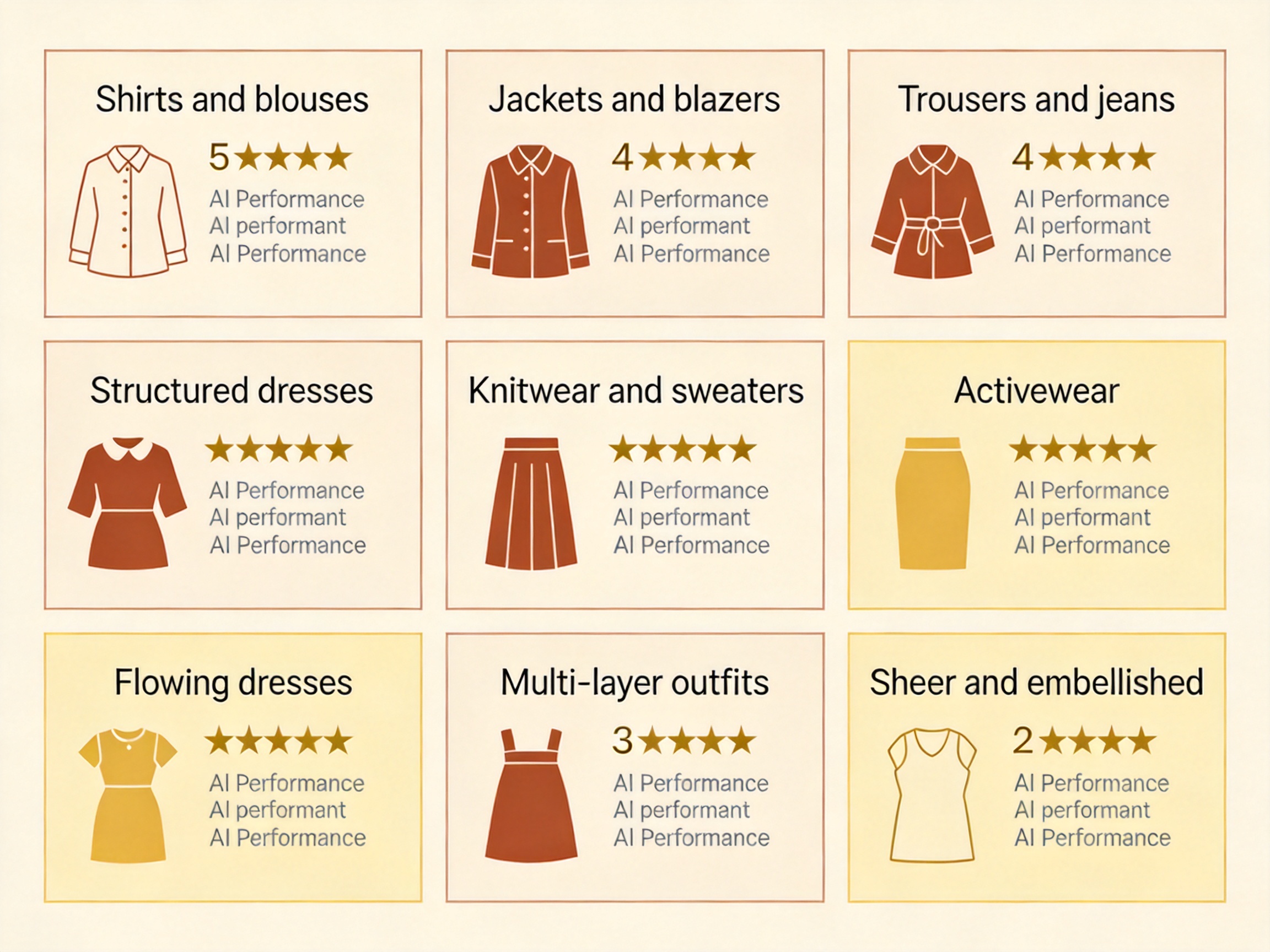
Structured, opaque garments with clear edges produce the most reliable results. If your catalog is mostly t-shirts, button-downs, and structured dresses, you'll have a smooth experience. If you sell heavily embellished evening wear or sheer fabrics, expect to spend more time on quality review and regeneration.
AI fashion model generator vs. traditional photography: the real cost comparison
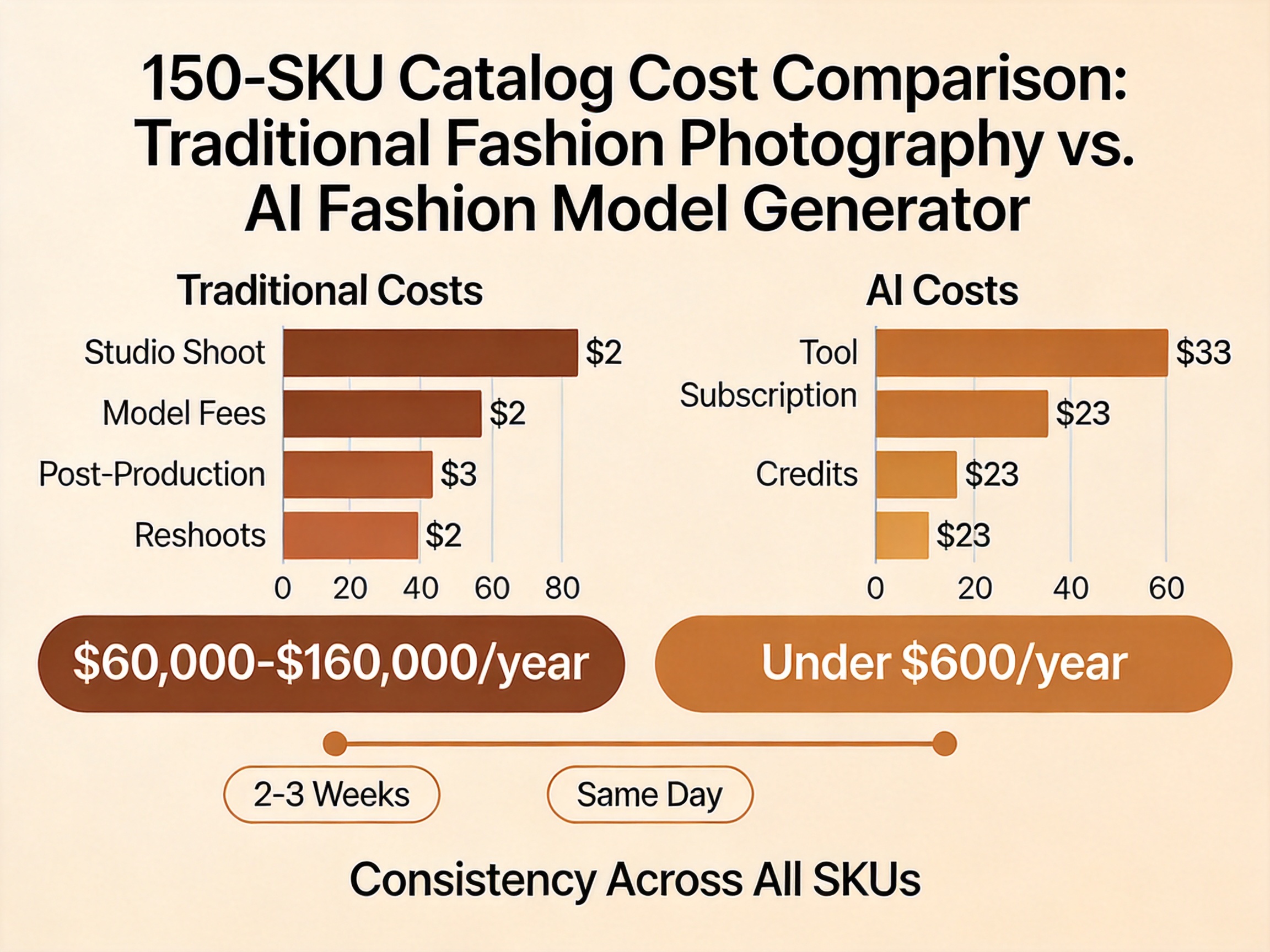
Let's put numbers on the difference. Here's what a mid-size apparel brand (150 SKUs, 4 seasonal refreshes per year) actually spends:
| Cost item | Traditional photography | AI fashion model generator |
|---|---|---|
| Per-SKU cost | $100-$268 | Under $1 |
| Time from brief to final images | 2-3 weeks | Same day |
| Catalog production (600 images/year) | $60,000-$160,000 | Under $600 in credits |
| Color variants (4 per SKU) | Full reshoot required | Included — change color input, regenerate |
| Reshoots and corrections (~15%) | $9,000-$24,000 | Near zero — regenerate for free |
| Model consistency across catalog | Difficult — different models per shoot | Automatic — same preset applied everywhere |
| Hero campaign imagery | Still needed | Still needed — AI complements, doesn't replace hero creative |
The numbers make the case clearly: for routine catalog and marketplace imagery, AI fashion model generation reduces costs by 95-99% and compresses timelines from weeks to hours. The catch is that hero campaigns, creative lookbooks, and brand-defining imagery still benefit from professional photography with creative direction. The smartest approach is hybrid: use AI for catalog production and color variants, and reserve studio time for the images that define your brand.
Common mistakes when implementing an AI fashion model generator
Mistake 1: Expecting one-click perfection on every image
AI fashion model generators get you 70-85% of the way there on the first try. The remaining 15-30% of images will need regeneration or light adjustment. Build review time into your workflow — don't expect to upload 200 products and download 200 perfect images without human oversight.
Mistake 2: Using inconsistent product photos
If your product images vary in lighting, angle, background, and quality, your AI outputs will vary too. Standardize your product photography before you introduce AI generation. The investment in consistent source images pays for itself in fewer regeneration attempts.
Mistake 3: Picking the wrong model preset for your audience
A brand selling to plus-size women shouldn't use a straight-size model preset just because the AI makes it the default. Match your model demographics to your actual customer base. Most tools support multiple body types, skin tones, and age ranges — use them.
Mistake 4: Skipping the quality review step
AI can produce images with subtle issues: slightly off colors, unnatural hand positions, fabric textures that look "painted" rather than woven. A 30-second human review per image catches these problems before they reach your product pages. Automated batch processing without review is how you end up with six-fingered models on your storefront.
Mistake 5: Not disclosing AI-generated imagery
Platforms and consumers are increasingly expecting transparency about AI-generated content. Add a visible "AI-generated" label on product detail pages and consider C2PA metadata. Meta automatically labels AI content; Google Shopping and Amazon have evolving AI image policies. Being upfront about AI usage builds trust rather than eroding it.
How ezpixy's AI fashion model generator fits into this workflow
ezpixy's AI fashion model generator is built specifically for apparel ecommerce teams — not for generic portrait generation. The workflow is designed around catalog production: upload flat lays or mannequin shots, select model presets (body type, pose, background), generate on-model images, and download in formats optimized for product pages and marketplaces.
What differentiates it from general-purpose AI image tools is the integrated ecommerce workflow. After generating on-model images, you can process them through white background removal for Amazon compliance or feed them into AI product photo workflows for channel-specific formatting — all without leaving the platform. Batch processing supports 50+ SKUs in a single session with consistent model presentation across the entire output.
The free tier (20 images/month) is enough to test the workflow with your own products before committing. Paid plans start at $19/month with higher volume limits and priority processing.
For a broader comparison of AI clothes changing tools, see my review of the best AI clothes changers. For the distinction between merchant-facing model generation and shopper-facing try-on, read AI clothes changer vs virtual try-on.
FAQ
What's the difference between an AI fashion model generator and an AI clothes changer?
They overlap but serve different primary users. An AI fashion model generator is built for ecommerce teams producing catalog imagery — the output goes on product pages, marketplaces, and ads. An AI clothes changer is often shopper-facing, helping customers preview how different garments look. In practice, many tools (including ezpixy) offer both capabilities under one platform.
Do I need special equipment or photography skills?
No. Clean product photos taken with a smartphone in good lighting work well. The key is consistency — same lighting, same angle, same background — not expensive equipment. Avoid harsh shadows and cluttered backgrounds for best results.
Can AI-generated model images pass marketplace requirements?
Yes, for product listing imagery. Amazon requires pure white backgrounds for main product images, which you can achieve by running the AI output through a background removal tool. Google Shopping and eBay have similar but less strict requirements. Always check current platform guidelines before uploading.
Will customers know the images are AI-generated?
At product page thumbnail resolution, modern AI fashion model generators produce images that are largely indistinguishable from studio photography for most garment types. However, transparency is becoming the industry standard — most brands now include a small "AI-generated" label on product detail pages.
How many images can I generate with the free tier?
ezpixy's free tier includes 20 images per month with full feature access — enough to test the workflow with your own products. Most AI fashion model generators offer free tiers or trials ranging from 5-50 images before requiring a paid plan. Start with free tiers to evaluate, then upgrade when you're processing real catalog volume.
Does the AI preserve my product's exact colors and patterns?
Modern AI fashion model generators have improved significantly on color accuracy and pattern preservation. Stripes, plaids, floral prints, and logos are generally well-preserved. However, always review outputs for color shifts — especially on products with subtle tonal variations. When in doubt, regenerate rather than publish an image with inaccurate colors.
Can I use the same model across my entire catalog?
Yes. Most tools support model presets that maintain consistent appearance (face, body type, skin tone) across every product in your catalog. This creates the cohesive, professional look that's difficult to achieve with traditional photography where different models appear across different shoots.
What happens to my product photos after I upload them?
Check each platform's terms of service. Reputable tools do not use your uploaded product images to train their AI models without explicit consent. ezpixy's terms specify that your images remain your property and are not used for model training. Always verify this before uploading sensitive or unreleased product imagery.
For a comparison of the best free and freemium AI fashion model generators with their free tier limits, see my AI clothes changer online free comparison.
Ready to speed up your image workflow?
Generate AI fashion models, product photos, and virtual try-on images in minutes.